5 Common WordPress Mistakes and How to Gently Fix Them

You poured your heart into your business, but does your WordPress website feel more like a source of stress than pride? That quiet, nagging feeling that something is slow, broken, or just not quite right can be so overwhelming, especially when you’re trying to do it all yourself. If you’re worried your website doesn’t truly capture the beautiful work you do, please know you are not alone. These feelings often stem from a few common wordpress mistakes that, thankfully, are much simpler to address than you might think.
My goal here isn’t to overwhelm you with technical jargon, but to gently walk you through this journey together. We will look at five of the most frequent missteps I see passionate business owners make, and I’ll share supportive, straightforward ways to fix them. By the end, you’ll have the clarity and confidence to nurture a stable, professional website that works beautifully and feels like a true, authentic reflection of you and your brand.
Key Takeaways
- Your website’s hosting and theme are its foundation. Learn how to choose a setup that supports your creative vision instead of limiting it.
- Simple, regular care is the secret to a healthy and secure website. Discover the essential maintenance tasks that keep your site safe and running smoothly.
- Your website is a conversation with your ideal clients. We’ll explore how small tweaks to your design and content can create a more welcoming experience.
- Understanding these common wordpress mistakes helps you know when DIY is empowering and when finding a creative partner is the kindest choice for your business.
Mistake #1: Choosing a Foundation That Doesn’t Support Your Vision
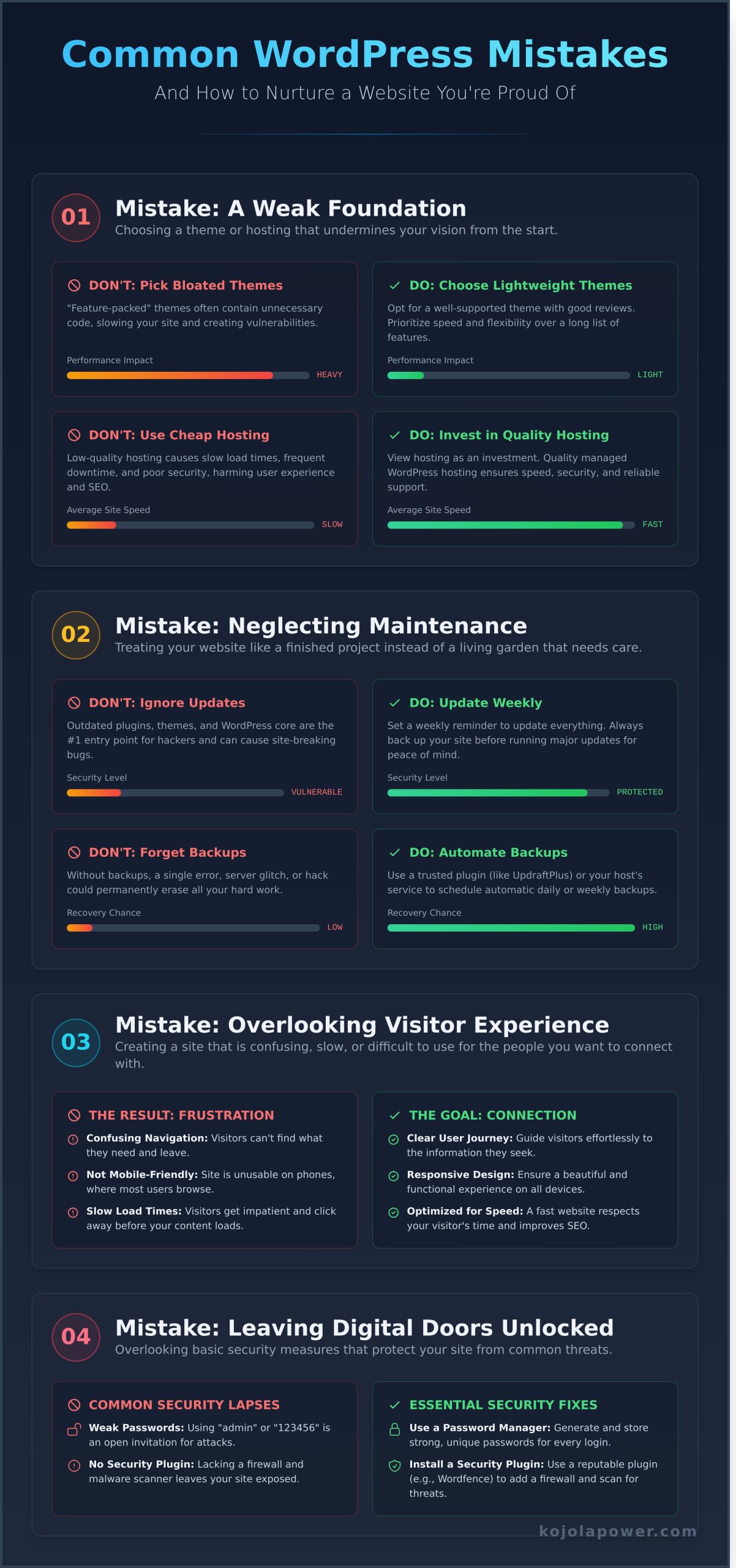
Think of your website as the online home for your business-a space you are co-creating to welcome visitors and share your unique gifts. The foundation of this home is built from two key elements: your hosting and your theme. Choosing the wrong ones is one of the most common wordpress mistakes, leading to a site that feels slow, unstable, and creatively limiting. A weak foundation can undermine all your hard work before your journey even begins.
Let’s explore two foundational missteps I see all too often, and how you can build a stable, beautiful base that truly supports your vision.
Picking the Wrong Theme
The beauty of the open-source WordPress platform is the incredible variety of themes available, but this can also be a trap. It’s easy to be drawn to a theme that promises dozens of flashy features, but these “bloated” themes are often packed with unnecessary code that dramatically slows your site down. Others may be poorly coded or no longer supported by their developers, leaving your site vulnerable.
The Fix: Instead of chasing features, choose a lightweight, well-supported theme that reflects your brand’s true essence. Look for themes with a history of recent updates and glowing reviews from other users. Your theme should be a flexible canvas for your vision, not a heavy frame that weighs it down.
Settling for Cheap, Low-Quality Hosting
Your web host is the plot of land where your online home is built. If the land is unstable or in a bad neighborhood, it affects everything. Cheap, low-quality hosting often means slow loading times, poor security, and frustrating downtime. A slow website doesn’t just annoy your visitors; it can also harm your search engine rankings, making it harder for the right people to find you.
The Fix: View your hosting as a vital investment, just like choosing a great location for a physical storefront. I always recommend investing in a quality managed WordPress host known for excellent speed, security, and supportive customer service. This decision provides the stability and peace of mind you need to focus on growing your business with confidence.
Mistake #2: Neglecting Ongoing Care and Maintenance
Think of your beautiful website as a garden you’ve lovingly planted. You wouldn’t just walk away and expect it to flourish, would you? Your site needs that same consistent, gentle attention to stay healthy and vibrant. Neglecting simple care is one of the most common wordpress mistakes, and it can leave the digital home you’ve worked so hard on vulnerable to security risks and frustrating errors.
These small, consistent actions are what protect your hard work and keep your site thriving. Let’s look at a couple of the most important oversights in website care that I see all too often.
Ignoring Updates for Plugins, Themes, and Core
The developers behind WordPress, your theme, and your plugins are always working to make their software better and safer. Updates often contain critical security patches to protect your site from hackers and other threats. Following established WordPress security best practices, like keeping everything updated, is the simplest way to keep your site safe. They also fix bugs and can even improve your website’s performance, making it a better experience for your visitors.
- The Gentle Fix: Set a weekly reminder in your calendar to check for and apply any available updates. Think of it as a small, mindful moment to tend to your site.
- A Quick Tip: Always back up your site before running major updates. It’s a simple safety net that gives you complete peace of mind.
Forgetting to Set Up Regular Backups
Imagine a backup as a complete, perfect copy of your website, frozen in a specific moment. It’s your ultimate safety plan. Without regular backups, a server glitch, a major error, or a security breach could erase all the beautiful content and design you’ve co-created. It’s a heartbreaking scenario that is entirely preventable.
- The Gentle Fix: Use a trusted backup plugin (like UpdraftPlus or BackupBuddy) or check if your web host offers an automatic backup service as part of your plan.
- A Quick Tip: Schedule automatic daily or weekly backups. This way, you can rest easy knowing that a recent, healthy version of your site is always safe and sound, no matter what happens.
Mistake #3: Overlooking the Visitor Experience
Your website is a beautiful, digital extension of you and your work. It exists to create a genuine connection with your ideal clients. But sometimes, in our excitement to share our vision, we can make simple design and content choices that create a frustrating or confusing experience for the very people we want to welcome. This is one of the most common wordpress mistakes, but it’s also one of the most rewarding to fix.
Focusing on your visitor’s journey makes your site more effective, intuitive, and engaging. Let’s co-create a space that not only looks like you but also feels wonderful for others to interact with.
Uploading Large, Unoptimized Images
Have you ever clicked on a website and waited… and waited… for the images to load? Huge, unoptimized image files are a primary cause of slow pages. A visitor’s patience is short, and they may leave before your beautiful work even has a chance to appear. A snappy, responsive website is a core part of a positive visitor experience, which is why a consistent maintenance routine that includes performance checks is so important. For a quick win, focus on your images.
- The Fix: Before you upload, try to resize your images to the dimensions you actually need. Then, use a free and gentle plugin like Smush or ShortPixel to automatically compress them without losing quality.
Not Having a Clear Path for Your Visitors
Imagine walking into a beautiful shop with no signs and no staff to help you. That’s what a website can feel like without a clear path. A confusing menu or a lack of clear calls-to-action can leave your visitors feeling lost and unsure of what to do next. Every page should gently guide them on their journey.
- The Fix: Simplify your main navigation to the essentials. On each page, think about the one thing you want your ideal client to do next. Guide them with clear, friendly buttons like ‘Contact Me,’ ‘View My Work,’ or ‘Learn More About My Process.’
Forgetting Basic SEO (Search Engine Optimization)
Making your website invisible online is another of the most common wordpress mistakes. SEO isn’t about technical tricks; it’s about helping your ideal clients find you when they’re searching for a solution you provide. Ignoring the basics of SEO means your authentic, beautiful website might never be discovered by the people who need you most.
- The Fix: You don’t need to be an expert! A wonderful plugin like Yoast SEO will guide you through setting page titles and meta descriptions. Most importantly, focus on writing helpful, clear content. Think about the words and phrases your clients would use and weave them into your writing naturally.
Mistake #4: Leaving the Digital Doors Unlocked
The idea of website security can feel big and intimidating, but I want to reassure you that the basics are quite simple. Taking a few thoughtful steps can create a much safer space for your website to live and grow. This isn’t just a technical task; it’s about protecting the beautiful business you’ve built, your valuable data, and the deep trust your clients place in you.
Of all the common wordpress mistakes we see, this one can feel the most technical, but I promise it’s not. Let’s walk through two simple fixes to lock your digital doors and bring you peace of mind.
Using ‘admin’ as a Username and a Weak Password
When WordPress is first installed, it often suggests ‘admin’ as the default username. Hackers know this, and their automated bots are programmed to try that username first, over and over. When it’s paired with a simple password like ‘password123’ or ‘yourbusinessname,’ it’s an open invitation for trouble.
The fix is a simple, creative act: create login details that are unique to you.
- Create a unique username. Choose something that isn’t easily guessable like your name or business name.
- Use a strong password. The best passwords are long and complex. Think of a short, memorable phrase and add some numbers and symbols. A password manager is a wonderful tool that can generate and remember these for you, taking one more thing off your plate.
Not Installing an SSL Certificate (HTTPS)
Have you ever visited a site and seen a ‘Not Secure’ warning from your browser? It immediately erodes that feeling of trust. That warning appears on sites without an active SSL certificate, which is responsible for creating a secure, encrypted connection between your website and your visitors.
An SSL certificate is a digital padlock. It protects any information shared on your site and shows your audience that you care about their safety. The wonderful news is that most quality web hosts provide a free SSL certificate. You can typically activate it with just a few clicks inside your hosting control panel, instantly making your site a more welcoming and trustworthy home for your brand’s essence.
Fixing these security issues is a huge step in avoiding the most damaging common wordpress mistakes and building a stronger foundation for your business. If this still feels overwhelming, know that creating a secure digital space is a core part of the co-creation journey when we build a website together at kojolapower.com.
When DIY Becomes D-I-Why: Knowing When to Ask for a Partner
Building your own WordPress website is an amazing accomplishment. You’ve poured your time, energy, and heart into creating a digital home for your business, and that deserves to be celebrated. But sometimes, the journey of maintaining and growing that home can become overwhelming. The initial pride can slowly turn into frustration as you spend more time fixing things than doing the work you truly love.
Recognizing when you need support isn’t a sign of failure; it’s a sign of a wise and focused business owner. Many of the most common wordpress mistakes stem from trying to do it all alone. It’s okay to trade the stress of DIY for the joy of co-creation, and to find a partner who can help bring your vision to life with ease and grace.
Signs You’re Ready for a Creative Partner
If you find yourself nodding along to any of these, it might be time to explore a more supportive path:
- You spend more time troubleshooting plugins and mysterious glitches than you do serving your clients or growing your business.
- When you look at your website, you feel a disconnect. It no longer captures the true essence and evolution of your beautiful work.
- You have a clear vision in your head for how your site should look and feel, but you’re endlessly frustrated trying to make it happen on the screen.
- You know you’re ready for a change and a new level of professionalism, but the path forward feels overwhelming and you don’t know where to begin.
The Gentle Path to a Website You Love
Working with a designer isn’t about giving up control-it’s about gaining a creative ally. Think of it as a collaboration, a process of co-creating a website that is authentically and intuitively you. It’s a journey we take together to ensure your digital presence is a true reflection of your heart-centered work.
This partnership frees you to focus on what you do best. While an expert handles the technical details and design, you get your precious time and energy back. Instead of wrestling with code, you can pour your heart into your craft, knowing your website is in caring, capable hands. Let’s have a gentle 15-minute chat about your vision.
Your Website is a Journey, Not a To-Do List
Navigating your WordPress site can feel like a big responsibility, but it’s also a beautiful opportunity to connect and grow. The journey begins with a strong foundation that truly supports your vision and continues with consistent, gentle care. By focusing on creating a welcoming experience and keeping your digital doors securely locked, you transform your site from a simple tool into an authentic online home. Viewing these common wordpress mistakes not as failures, but as guideposts, allows you to pour your attention where it matters most.
If that list feels more overwhelming than empowering, please take a gentle breath. You don’t have to figure it all out alone. Sometimes, the wisest move is knowing when to ask for a partner to walk alongside you. My process is deeply collaborative and supportive, built on a foundation of kind, patient, and thoughtful guidance. Together, we can translate your unique essence into a beautiful, intuitive website that feels just right.
Feeling overwhelmed? Let’s co-create a website that feels like you.
Frequently Asked Questions
What is the single most important WordPress mistake to fix first?
I always encourage clients to focus on security and backups first. Think of it as creating a safe, loving home for your beautiful online presence. Before you worry about anything else, make sure your hard work is protected. Installing a good security plugin and setting up automatic backups gives you the peace of mind to focus on the creative journey ahead. It’s the most loving thing you can do for your website.
How often should I be backing up my WordPress website?
The best rhythm for backups depends on how often you’re co-creating new content. If you’re blogging, adding products, or making changes daily, then a daily backup is essential to protect your fresh ideas. For websites that are updated less frequently, perhaps weekly, a weekly backup is a wonderful safety net. The key is to choose a schedule that ensures your latest creative work is always safe and sound.
Can I fix all of these mistakes myself without being a developer?
Absolutely! I wrote this guide with you in mind-the creative entrepreneur, not the coder. Each solution is designed to be intuitive and manageable, often using trusted plugins to do the heavy lifting for you. Think of it as a gentle, guided journey to a healthier website. You have the power to make these positive changes yourself, and I’m here cheering you on every step of the way. You can do this!
How do I know if my website is slow, and what’s a good loading speed?
A great way to check your site’s speed is with a free tool like Google PageSpeed Insights. It gives you a clear picture of how quickly your pages load for visitors. A truly wonderful goal is to have your site load in under 3 seconds-ideally, under 2! This creates a smooth, welcoming experience for everyone who visits, allowing your authentic message to shine through without any frustrating delays.
Will changing my WordPress theme affect my content?
This is such a great question, and I can reassure you: changing your theme will not delete your core content. Your beautiful words, pages, and blog posts are all safely stored in WordPress. What will change is the visual presentation-the layout, colors, and fonts that frame your content. Think of it like moving your art into a new gallery. The art is the same, but the walls and lighting are different.
I’m not getting any traffic. Which mistake should I focus on to improve my SEO?
It can feel disheartening when your beautiful work isn’t being seen. If traffic is your main concern, I would gently guide you to focus on the section about neglecting basic SEO. Many common wordpress mistakes stem from not having an SEO plugin like Yoast set up correctly. Making sure your site is visible to search engines and that your content is optimized is the first, most powerful step in helping the right people find you.